
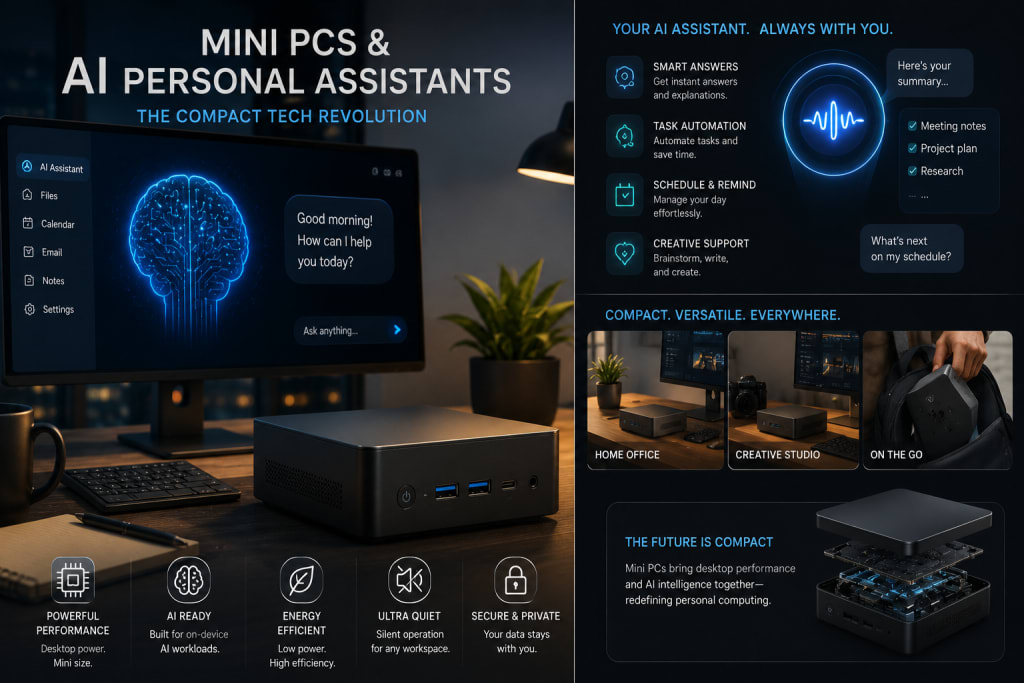
Mini PCs & AI Personal Assistants: The Compact Tech Revolution
The future of personal computing is getting smaller, quieter, and smarter.
For years, the desktop PC meant a tower under the desk, a mess of cables, a loud fan, and enough unused space inside the case to make the machine feel almost industrial. Laptops solved portability, but they brought their own compromises: smaller screens, limited upgradeability, heat, battery anxiety, and the constant need to carry the main computer everywhere.
Now a different kind of machine is stepping into the spotlight: the mini PC.
Small enough to fit behind a monitor, under a desk, on a shelf, beside a TV, or inside a tiny studio setup, mini PCs are becoming serious everyday computers. They are not just office boxes anymore. The newest models can handle work, streaming, light gaming, creative tasks, home servers, media centers, automation, and increasingly, local AI personal assistants.
That last part is what makes the trend feel revolutionary.
In 2026, mini PCs are no longer only about saving space. They are becoming compact AI hubs: always-on machines that can run local language models, manage files, summarize notes, control smart-home devices, automate tasks, host private chatbots, assist with coding, organize calendars, process documents, and serve as personal AI companions without depending entirely on cloud services.
The timing is perfect. AI PCs are becoming mainstream, with AMD saying 2026 is the year it expects AI PCs to outsell non-AI PCs. At CES 2026, AI hardware moved into practical everyday devices, from compact AI computers to smart-home tools and personal assistants. Tom’s Guide highlighted devices such as HP’s keyboard-sized EliteBoard G1a, AMD’s Ryzen AI Max+ 395, Framework Desktop for AI-focused computing, Samsung’s AI fridge, SwitchBot’s AI Hub, and other tools that show AI becoming part of daily life rather than only a cloud chatbot.
Mini PCs sit right in the middle of that shift.
They are powerful enough to run real workloads.
Small enough to disappear into a room.
Efficient enough to stay on.
And increasingly smart enough to become the brain of a personal AI setup.
Why Mini PCs Are Having a Moment
Mini PCs are rising because modern users want performance without bulk.
Not everyone needs a full tower. Many people now work from smaller apartments, shared rooms, home offices, dorms, studios, and hybrid workspaces. A giant desktop feels unnecessary when a small box can drive multiple monitors, connect fast storage, support Wi-Fi 7, run office tools, handle browser-heavy workflows, and power creative software.
At the same time, laptops are not always ideal as main work machines. A laptop is portable, but using it all day docked to monitors can feel awkward. It may run hot, throttle performance, or limit ports. A mini PC offers a cleaner setup: plug it into a monitor, keyboard, mouse, audio system, and external drives, then leave it there.
The appeal is simple:
Small footprint.
Lower power use.
Clean desk setup.
Strong performance per liter.
Easy monitor pairing.
Often quieter than towers.
Usually cheaper than equivalent premium laptops.
More flexible than all-in-one PCs.
Better suited for always-on home services.
That last point is crucial. An AI personal assistant works best when it is always available. A laptop may be closed, sleeping, traveling, or out of battery. A mini PC can sit quietly at home, ready to respond to requests, run automations, host local AI models, or act as the personal server for your digital life.
That is why the mini PC is becoming more than a tiny desktop.
It is becoming a personal infrastructure device.
The AI PC Shift
The phrase AI PC refers to computers designed with dedicated AI acceleration, often through NPUs, modern GPUs, or high-performance integrated processors that can run AI workloads more efficiently. These workloads may include image generation, transcription, local chatbots, background blur, voice cleanup, document summarization, coding assistance, translation, search, and automation.
AI PCs matter because they reduce dependence on the cloud. Instead of sending every request to a remote server, more tasks can happen locally on the device. AMD’s 2026 AI PC messaging emphasizes local inference as a way for teams to gain tighter control over sensitive data, more predictable performance, and freedom from API limits or variable token pricing.
For personal users, that means several things.
Your private files can stay on your machine.
Your assistant can work even when the internet is limited, depending on the model.
You can customize workflows.
You can avoid constant subscription costs for every AI task.
You can build assistants that know your documents, projects, media, and routines.
A mini PC with AI hardware becomes especially attractive because it can act as a local AI station. It may not replace the most powerful cloud models for every advanced task, but it can handle many practical daily functions privately and cheaply once configured.
That is the compact tech revolution: AI moving from distant cloud services into small computers in ordinary homes.
Mini PCs as Personal AI Assistants
The most exciting use of a mini PC is not simply running Windows or Linux in a small box. It is turning that small box into a personal AI assistant.
Imagine a mini PC sitting on your desk or hidden behind your monitor. It runs quietly all day. It connects to your files, notes, calendar, email, smart-home devices, media library, and messaging tools. You can ask it to summarize a PDF, search your documents, draft a reply, organize downloads, transcribe a meeting, remind you about tasks, generate code snippets, monitor your home server, or prepare a daily briefing.
Unlike a cloud-only chatbot, your local assistant can be deeply tied to your personal environment.
It can know where your project files are.
It can watch a folder for new documents.
It can process local PDFs.
It can run automations.
It can connect with Home Assistant.
It can act as a private search engine.
It can store your own knowledge base.
It can be available through Telegram, web UI, voice interface, or local dashboard.
Recent real-world hobbyist examples show this direction clearly. A developer recently wrote about turning a $300 Intel NUC into an always-on AI secretary that responds through Telegram, accesses project files, drafts emails, prepares marketing copy, and stays available even when the laptop is closed. That kind of setup may sound geeky today, but it points toward a mainstream future.
The AI assistant does not need to live only inside a phone app.
It can live inside your own mini PC.
Why Local AI Matters
Cloud AI is powerful, convenient, and improving rapidly. But local AI has advantages that are becoming harder to ignore.
Privacy is the first one. Many people do not want every document, work note, family plan, financial file, or personal message sent to cloud services. A local AI assistant can process sensitive information on your own machine.
Cost is another advantage. Cloud AI can become expensive if you use it heavily. Local models require hardware upfront, but once installed, they can run without per-message charges.
Speed can also be better for certain tasks. A local assistant does not always need to wait for server response or network latency.
Customization is a major benefit. You can tune the assistant around your own folders, scripts, templates, knowledge base, and workflow.
Availability matters too. If a cloud service is down, rate-limited, blocked, or changed, your local assistant can still function.
Of course, local AI has limits. It may be less capable than the best cloud models. It may require setup. It may need enough RAM, storage, and GPU or NPU power. It may be slower on small hardware.
But the direction is clear: many everyday AI tasks do not need a giant remote model. They need a helpful assistant close to your data.
Mini PCs are ideal for that role.
The New Mini PC Hardware
Modern mini PCs are far more capable than older tiny desktops.
Many now use laptop-class or workstation-class chips with strong integrated graphics, AI acceleration, fast DDR5 or LPDDR5X memory, NVMe SSDs, USB4, Wi-Fi 7, 2.5GbE networking, HDMI 2.1, DisplayPort, and support for multiple monitors.
ASUS is pushing AI-focused NUC systems, describing its AI NUC line as compact, powerful, and AI-driven, designed for creators, gamers, and business professionals. ASUS’s CES 2026 mini PC announcements also included the NUC 16 Pro Mini PC with Intel Core Ultra X9 Series 3 chips and a reported 180 platform TOPS for AI tasks, with AI SuperBuild software designed to help companies train their own language models without sending proprietary data off-site.
AMD-based mini PCs are also becoming very serious. GEEKOM’s A9 Max AI mini PC is marketed with a Ryzen AI 9 HX 370, Radeon 890M graphics, 50 TOPS NPU, dual 2.5G LAN, Wi-Fi 7, USB4, and a sub-1L chassis. Arctic’s Senza AI 370 is another example: a fanless under-desk mini PC with Ryzen AI 9 HX 370, 32GB RAM, 1TB SSD, Radeon 890M graphics, USB4, Wi-Fi 7, and support for up to 8K monitors.
This is not the old world of weak mini boxes only good for email.
A modern mini PC can be a workstation, AI node, media server, office machine, development box, home automation hub, and personal assistant engine.
All in a box smaller than many routers.
The Appeal of Always-On Computing
Mini PCs are perfect for always-on computing.
A full desktop tower can run 24/7, but it uses more space and often more electricity. A laptop can stay on, but it is not designed as cleanly for always-on server-like use, and it may be moved around. A mini PC can sit quietly in one place, drawing relatively modest power while handling background tasks.
Always-on computing matters for AI assistants because an assistant should not disappear when your laptop is closed.
It should be able to:
Answer messages.
Run scheduled tasks.
Monitor files.
Control smart-home routines.
Download and organize data.
Host dashboards.
Process documents overnight.
Sync backups.
Listen for voice commands if configured.
Run local search.
Serve as a private knowledge base.
For DevOps engineers, creators, students, writers, small-business owners, and home-lab users, this is extremely attractive. A mini PC can become a small private cloud.
The future assistant may not be a humanoid robot.
It may be a silent box under your monitor.
Mini PCs and Smart Homes
Smart homes often suffer from fragmentation. Lights, cameras, thermostats, sensors, speakers, appliances, locks, and plugs may come from different brands with different apps. A local hub can bring them together.
Mini PCs are excellent for running Home Assistant, Node-RED, MQTT brokers, local dashboards, automation scripts, media servers, and privacy-focused monitoring. Add AI, and the smart home becomes more conversational.
Instead of setting rigid automations manually, you could ask:
“Turn off everything downstairs except the hallway light.”
“Create a night mode when the front door is locked after 11 p.m.”
“Summarize what happened at home today.”
“Show me unusual power usage.”
“Remind me if the washing machine finishes after 10 p.m.”
“Alert me if the office temperature rises above 30°C.”
An AI assistant running on a mini PC can connect natural language with local automation logic. The SwitchBot AI Hub was recognized in Tom’s Guide’s 2026 AI Awards for improving home automation through natural communication, showing how this category is becoming more mainstream.
The best smart home may not be controlled by ten apps.
It may be controlled by one local AI brain.
Mini PCs for Creators
Creators are one of the strongest audiences for AI mini PCs.
Video editors, photographers, designers, writers, podcasters, YouTubers, streamers, and social media managers all deal with heavy workflows. They need storage, organization, transcription, summaries, thumbnails, drafts, captions, metadata, scripts, and backups.
A mini PC can help by acting as:
A media library server.
A video rendering helper for lighter projects.
A local transcription machine.
A photo backup station.
A content planning assistant.
A local AI writing helper.
A thumbnail generation station, depending on GPU capacity.
A file organizer.
A private archive.
A streaming or recording companion.
Because many modern mini PCs support multiple monitors and fast storage, they can also be used as primary creative workstations, especially for moderate editing and design work.
For heavier 3D rendering or high-end video workflows, full desktops and GPU workstations still win. But for many creators, the mini PC is now enough.
The compact machine is not replacing every workstation.
It is replacing the idea that powerful work always needs a huge tower.
Mini PCs for Developers and DevOps
For developers, mini PCs are almost perfect.
They can run Linux, containers, local databases, test environments, CI runners, Kubernetes labs, home servers, code assistants, and automation scripts. For DevOps users, a mini PC can become a tiny homelab node.
You can run:
Docker.
K3s.
PostgreSQL.
Redis.
Local LLMs.
Vector databases.
Git mirrors.
Monitoring tools.
Grafana dashboards.
Home Assistant.
Private documentation search.
VPN gateways.
A local AI assistant can also help developers by reading codebases, summarizing logs, drafting documentation, generating shell scripts, checking configs, and acting as a project-specific helper.
This is especially useful when privacy matters. You may not want to upload proprietary code or infrastructure secrets to cloud AI tools. A local assistant on a mini PC can process private repositories more safely, as long as the setup is secured.
For someone already comfortable with Linux and Docker, a mini PC is one of the best AI productivity investments.
The Personal AI Secretary
The idea of a personal AI secretary is becoming more realistic.
Not a cartoon assistant. Not a robot butler. A practical digital helper that sits in the background and manages information.
A mini PC-based AI secretary could:
Read daily calendar events.
Summarize unread documents.
Draft routine emails.
Track tasks.
Search old notes.
Monitor project folders.
Generate meeting summaries.
Create reminders.
Organize downloads.
Summarize news feeds.
Prepare daily briefings.
Answer Telegram or Slack messages through approved workflows.
Help with code snippets.
Manage household automations.
This is where mini PCs become deeply personal. The assistant does not need to be powerful in a general sense. It needs to understand your life, your files, your habits, and your workflows.
That is why local AI is compelling. A cloud assistant knows the internet. A local assistant can know your own digital world.
The revolution is not that computers are getting smaller.
It is that small computers are getting closer to us.
Compact Tech for Small Spaces
Urban living is another reason mini PCs are growing.
Many people do not have large offices. They work from bedrooms, small apartments, shared flats, dorms, or compact studios. A traditional desktop tower can feel intrusive. A mini PC can disappear behind a monitor or sit neatly beside a router.
This matters aesthetically too. People care more about clean setups now. Desk setups are part of lifestyle culture: cable management, monitor arms, mechanical keyboards, speakers, plants, lighting, and minimal clutter.
A mini PC fits this world beautifully.
It gives desktop comfort without desktop bulk.
For people who want a stylish workspace, a mini PC is easier to integrate than a tower. Some models are elegant enough to be visible. Others are mountable and can disappear completely.
That is why mini PCs appeal to both tech enthusiasts and design-conscious users.
They are powerful, but they do not dominate the room.
Mini PCs as Media Centers
Before AI became the headline, mini PCs were already popular as media centers.
They can connect to TVs, run Plex or Jellyfin, stream 4K video, manage local movie libraries, emulate retro games, handle IPTV tools, and act as home entertainment hubs. Add AI, and media centers become smarter.
A local assistant could organize your media, generate summaries, recommend what to watch based on household preferences, transcribe videos, search subtitles, or create playlists.
For families, a mini PC connected to a TV can become a shared household computer: streaming, video calls, casual gaming, browsing, learning, and smart-home control.
This makes mini PCs especially attractive in homes where a full desktop feels unnecessary but a smart TV feels too limited.
The TV becomes the screen.
The mini PC becomes the brain.
Mini PCs and Privacy
Privacy is one of the strongest arguments for mini PCs in the AI era.
Cloud assistants are convenient, but they create a basic problem: the more useful they become, the more data they need. Documents, emails, calendars, photos, voice recordings, health notes, and business files all become potential inputs.
A local AI mini PC allows users to keep more processing inside the home.
This does not automatically guarantee privacy. You still need secure configuration, disk encryption, firewall rules, good passwords, software updates, and careful model/app selection. But local control gives you more options.
You can choose open-source tools.
You can decide what data is indexed.
You can keep sensitive folders offline.
You can restrict remote access.
You can avoid sending every prompt to a cloud provider.
For small businesses, freelancers, lawyers, doctors, researchers, developers, and anyone handling confidential material, that control matters.
The future of AI privacy may not be refusing AI.
It may be owning more of the AI stack.
The Cost Advantage
Mini PCs can be surprisingly cost-effective.
A premium laptop includes a screen, keyboard, battery, trackpad, webcam, hinges, speakers, and thermal design for portability. A mini PC skips many of those parts and focuses on compute. If you already have a monitor, keyboard, and mouse, a mini PC can deliver excellent performance for the price.
For AI, the cost calculation depends on the hardware. Basic mini PCs can run small models and automation tasks. More powerful AI mini PCs with Ryzen AI, Intel Core Ultra, large RAM, and strong integrated graphics cost more but still may be cheaper and more efficient than building a large desktop.
Of course, if you need a powerful discrete GPU for large local models, a full desktop may still be better. Mini PCs are constrained by size, thermals, and GPU options. But for many personal assistant workflows, you do not need the biggest model. You need a reliable, private, always-on machine.
A $400–$1,000 mini PC can be more transformative than people expect.
The value is not only raw speed.
It is what the machine does quietly every day.
The Limits of Mini PCs
Mini PCs are powerful, but they are not magic.
They have thermal limits. Small cases are harder to cool. Under heavy load, some models may become noisy or throttle performance.
Upgradeability varies. Some allow RAM and SSD upgrades. Others use soldered memory.
GPU performance is limited compared with full desktop gaming PCs unless the model supports external GPUs or has a special design.
Local AI workloads can require large amounts of RAM and VRAM. A mini PC with 16GB RAM may run small models, but larger models need 32GB, 64GB, 96GB, or more.
Repairability varies widely.
Ports differ by model.
Power adapters can be bulky.
Some cheap mini PCs have weak BIOS support, poor cooling, or unreliable drivers.
This is why buyers should choose carefully. The best mini PC is not the smallest one. It is the one that matches the workload.
For AI assistants, memory matters a lot.
For media centers, quiet cooling matters.
For development, storage and networking matter.
For office work, reliability matters.
For smart homes, always-on stability matters.
Compact does not mean compromise-free.
What Specs Matter for an AI Mini PC?
For an AI-focused mini PC, the most important specs are not always the same as for a normal office machine.
Memory is critical. More RAM allows larger models, bigger context, more services, and smoother multitasking. For basic AI assistant use, 16GB may work. For serious local LLM use, 32GB is better. For heavier models, 64GB or more is ideal.
Storage matters. AI models, vector databases, logs, documents, and media can eat space quickly. A 1TB NVMe SSD is a comfortable starting point. Upgrade options are valuable.
Processor matters. Modern Intel Core Ultra and AMD Ryzen AI chips include NPUs and efficient cores that improve AI and multitasking.
GPU or integrated graphics matter depending on workload. AMD’s Radeon 890M-class integrated graphics can handle some local AI and light gaming, while serious AI workloads may still prefer discrete GPUs.
NPU TOPS matter, but they are not the whole story. Software support is just as important.
Networking matters. 2.5GbE or dual LAN can be useful for homelabs and servers. Wi-Fi 7 is a nice bonus.
Ports matter. USB4, HDMI 2.1, DisplayPort, USB-A, USB-C, audio, and SD card slots can make the machine much more flexible.
Cooling matters. Quiet and stable beats tiny and hot.
Software support matters. BIOS updates, driver updates, Linux compatibility, and vendor reliability are important.
The perfect AI mini PC is balanced.
Not just powerful.
Usable.
Mini PCs vs Laptops
Should you buy a mini PC or a laptop?
Buy a laptop if you need portability, built-in screen, battery, webcam, keyboard, and all-in-one mobility.
Buy a mini PC if you mostly work at a desk, already use external monitors, want cleaner cable management, need an always-on machine, or want a compact local server.
For AI personal assistants, mini PCs often make more sense because they stay in one place. A laptop is personal and mobile. A mini PC is stable and persistent.
Many people may eventually use both:
Laptop for mobile work.
Mini PC for home base, AI assistant, automation, server, backups, and heavier desk workflows.
This is similar to how people use phones and tablets. The devices do not replace each other completely. They specialize.
The mini PC is becoming the home base computer again.
Only smaller and smarter.
Mini PCs vs Full Desktops
Full desktops still win in maximum performance, upgradeability, cooling, and high-end GPU support.
If you need a top-tier GPU for 3D rendering, large local AI models, serious gaming, video production, or workstation workloads, a full tower may still be best.
But mini PCs win in size, simplicity, energy efficiency, and quiet everyday use.
For many people, a full desktop is overkill. Browser work, documents, coding, light editing, streaming, home automation, local AI assistants, and media serving do not require a giant tower.
The choice depends on ambition.
If you want the most powerful machine possible, build a desktop.
If you want a compact machine that quietly makes daily life smarter, buy a mini PC.
AI Assistants and the Future of Work
AI personal assistants will change how people work.
Instead of opening ten apps, searching folders, checking calendars, and writing repetitive messages manually, users will increasingly delegate small tasks to local or hybrid assistants.
A mini PC assistant could prepare a morning work summary:
Today’s meetings.
Pending emails.
Tasks due.
Files changed.
Weather.
News relevant to your industry.
Server alerts.
Travel reminders.
Draft responses.
At the end of the day, it could summarize what changed, what needs follow-up, and what can be automated.
For freelancers and small teams, this is huge. It gives one person the feeling of having a lightweight operations assistant.
But there is a danger too. Bad AI assistants can create mistakes, send wrong messages, hallucinate summaries, or automate things without enough approval. The safest approach is human-in-the-loop.
Let AI draft.
You approve.
Let AI summarize.
You verify.
Let AI suggest.
You decide.
The assistant should reduce cognitive load, not take uncontrolled authority.
Voice Assistants Become More Personal
Voice assistants like Alexa, Siri, and Google Assistant made voice control mainstream, but many users found them limited. They could set timers, play music, control lights, and answer basic questions, but they often struggled with context and complex tasks.
Local AI assistants running on mini PCs could be more flexible. They can connect to local documents, personal scripts, smart-home systems, and custom workflows. They can be configured around individual needs rather than only generic commands.
A truly useful voice assistant might understand:
“Summarize the latest PDF in my Downloads folder.”
“Check if my backup completed.”
“Find the invoice from last month.”
“Turn off office lights when my meeting ends.”
“Draft a polite reply to this client.”
“Create a blog outline from my notes.”
“Remind me tomorrow to renew the SSL certificate.”
That is much more valuable than asking for the weather.
The mini PC makes this possible because it can run the bridge between voice, files, automations, and AI.
Personal Assistants Need Boundaries
As AI assistants become more capable, boundaries become essential.
An assistant connected to your files, email, calendar, and smart home can be powerful. It can also be dangerous if misconfigured.
You need permissions.
Which folders can it read?
Can it delete files?
Can it send emails?
Can it control locks?
Can it access cameras?
Can it purchase things?
Can it message people?
Can it run shell commands?
The safest systems will use layered permissions, confirmations, logs, and approval modes. For example, an assistant may draft an email but require human approval before sending. It may suggest deleting duplicate files but not delete automatically. It may control lights but not door locks unless explicitly confirmed.
The more personal the assistant, the more careful the design must be.
A compact AI revolution should not become a compact security nightmare.
Open-Source AI and Mini PCs
Open-source AI tools are one reason mini PCs are so exciting.
Users can run local models through tools such as Ollama, LM Studio, llama.cpp, Open WebUI, AnythingLLM, LocalAI, and other frameworks. They can create retrieval-augmented generation systems over their own documents. They can connect chat interfaces to local notes, PDFs, code repositories, and databases.
For technical users, this is already powerful.
For mainstream users, it is still too complicated. But that will change. Mini PC makers may increasingly ship AI-ready software, local assistant dashboards, model managers, and smart setup tools.
ASUS’s reported AI SuperBuild concept for training language models without sending proprietary data off-site shows how vendors are trying to package local AI into more accessible business workflows.
The future may look like this:
Buy a mini PC.
Choose “Personal AI Assistant” during setup.
Select folders and apps.
Choose privacy level.
Download recommended local models.
Start asking questions.
That is when local AI moves from hobbyist to household.
The Home Server Comes Back
For years, many people moved everything to the cloud: photos, documents, music, movies, backups, notes, calendars, and email. The cloud is convenient, but subscriptions, privacy concerns, storage limits, and platform lock-in are pushing some users back toward local ownership.
Mini PCs are reviving the home server idea.
A mini PC can host:
Photo libraries.
Media streaming.
Backups.
Personal cloud storage.
Password managers.
Document search.
Local AI.
Home automation.
VPN.
Private dashboards.
Family file sharing.
This does not mean everyone should abandon cloud services. But hybrid setups are becoming more attractive: cloud for convenience, local mini PC for control.
The AI personal assistant makes the home server more useful. Instead of just storing files, the server can understand them.
That is a major leap.
A folder full of PDFs becomes searchable knowledge.
A media library becomes organized memory.
A backup server becomes an intelligent archive.
Mini PCs for Education
Students can also benefit from mini PCs and AI assistants.
A compact AI mini PC can help with research organization, note summaries, flashcards, coding practice, language learning, document search, and distraction-free study setups. It can connect to a monitor and keyboard in a small dorm room without taking much space.
For families, a shared mini PC can become a learning station. Children can use supervised AI tools, educational software, creative apps, and coding environments without needing an expensive gaming desktop.
However, education use needs guardrails. AI should not become a homework cheating machine. The best use is tutoring, explanation, brainstorming, and feedback, not replacing student work.
A local assistant can be configured with rules and privacy controls, making it potentially safer than unrestricted cloud tools.
Compact does not mean casual.
For learning, the setup matters.
Mini PCs and Gaming
Mini PCs are not always gaming machines, but gaming performance is improving.
Modern AMD APUs with Radeon 780M or 890M-class integrated graphics can handle esports, indie games, older AAA titles, emulation, and some modern games at reduced settings. Higher-end mini PCs may support external GPUs through USB4 or OCuLink, though that adds cost and complexity.
For casual gamers, a mini PC can be enough.
For serious AAA gaming at high settings, a full gaming desktop or gaming laptop still makes more sense.
But mini PCs are excellent for retro gaming and living-room setups. They can run emulators, Steam indie titles, cloud gaming, and media apps in one box. Add AI features, and the same machine can also act as a home assistant.
The future living-room PC may be a mini PC that does everything:
Streams movies.
Runs games.
Controls smart devices.
Hosts AI assistant.
Stores family photos.
Manages home media.
That is a powerful compact package.
The Fanless Future
One of the most attractive mini PC trends is fanless design.
A fanless mini PC has no fan noise, fewer moving parts, and a cleaner acoustic profile. It is ideal for bedrooms, studios, recording setups, home theaters, and quiet offices.
Arctic’s Senza AI 370 is a notable example, using a large heatsink and heatpipes in an under-desk design to cool a Ryzen AI 9 HX 370-based system silently.
Fanless systems are not always the fastest, and they require careful thermal design. But for many people, silence is a major quality-of-life upgrade.
An AI assistant should feel invisible.
A noisy box defeats that feeling.
The best mini PCs of the future may not only be powerful.
They may be silent.
The Risk of AI Hardware Hype
The compact AI hardware market is exciting, but it is also full of hype.
Some companies market “AI-ready” devices without clear real-world AI benefits. TOPS numbers are advertised heavily, but software support may be limited. Some NPUs are useful only for specific frameworks. Some AI features depend on Windows Copilot+ or vendor apps that may not matter to every user.
Buyers should be careful.
Ask:
What AI tasks can this actually run?
Does the software I use support the NPU?
How much RAM does it have?
Can I upgrade memory?
Can it run local LLMs?
Does it support Linux?
Are there good drivers?
Is cooling strong enough?
Are reviews available?
Does the vendor provide updates?
AI labels are not enough.
Real usability matters.
The Compact Revolution Is Also Environmental
Mini PCs can reduce energy use compared with large desktops, especially for everyday tasks. Smaller machines require fewer materials than towers and can be more efficient when properly designed.
But environmental benefits depend on longevity and repairability.
A mini PC with soldered RAM, poor cooling, and short software support may become e-waste too quickly. A slightly larger model with replaceable memory, replaceable SSD, good cooling, and long support is often the better sustainable choice.
The compact revolution should not mean disposable computers.
It should mean efficient, repairable, long-lasting machines that do more with less space and energy.
That is the version worth supporting.
What to Look For Before Buying a Mini PC
A good mini PC purchase starts with use case.
For office work, browsing, streaming, and light productivity, a modest mini PC with 16GB RAM and 512GB or 1TB SSD is enough.
For AI assistant use, choose at least 32GB RAM if budget allows, especially if you want local models and multiple services.
For homelab use, prioritize RAM upgradeability, dual LAN if needed, storage slots, Linux compatibility, and cooling.
For media center use, prioritize quiet operation, HDMI 2.1, 4K/8K output support, storage expansion, and low power.
For creative work, prioritize CPU, RAM, fast SSD, USB4, SD card support, monitor output, and color-accurate display pairing.
For gaming, check integrated GPU performance or eGPU options.
For silent setups, consider fanless designs or well-reviewed quiet models.
For long-term value, choose upgradeable RAM and storage whenever possible.
A mini PC should fit your workflow, not just your desk.
Mini PCs and AI Personal Assistants in Daily Life
The most realistic future is not dramatic.
It is ordinary.
A mini PC wakes up before you do. It prepares your briefing. It checks weather, calendar, email summaries, server alerts, and reminders. It knows which documents you worked on yesterday. It suggests what to finish today. It controls lights when you enter the office. It transcribes a meeting. It drafts notes. It updates a task board. It reminds you to back up a folder. It sends a notification when your 3D print, download, or render finishes. It organizes photos from your phone. It summarizes a long article. It answers a question from your own knowledge base.
None of those tasks is science fiction.
Together, they change the feeling of computing.
The computer stops being only a tool you open.
It becomes a quiet helper that keeps your digital life moving.
That is the compact tech revolution.
Final Verdict
Mini PCs and AI personal assistants are reshaping everyday computing because they combine three powerful ideas: compact hardware, local intelligence, and always-on convenience. A mini PC no longer has to be a weak office box. Modern models can run serious workloads, connect multiple displays, support fast networking, host smart-home systems, and increasingly power local AI workflows.
The timing is perfect. AI PCs are moving into the mainstream, with AMD expecting 2026 to be the crossover year when AI PCs outsell non-AI PCs. CES 2026 also showed AI becoming embedded in practical devices, from keyboard-sized PCs and AI mini workstations to smart-home hubs and intelligent appliances.
The real opportunity is personal. A mini PC can become your private AI secretary, home automation brain, media server, coding assistant, document search engine, backup station, and creative helper. It can sit quietly in the corner, using less space and power than a traditional desktop while doing far more than a basic laptop dock.
There are still limits. Local AI needs enough memory and good software. Mini PCs have thermal constraints. AI marketing can be exaggerated. Privacy and permissions must be handled carefully. But the direction is clear.
The next big computer in your life may not be a giant tower or a flashy laptop.
It may be a small, silent box that knows your workflow, protects your data, runs your automations, and helps you think.
Compact tech is no longer about doing less.
It is about making intelligence fit anywhere.
